
Diagnosing Network Issues
Network Diagnostics helps admins verify that the license server is reachable on the expected IP/host and port, and quickly identify common network/config issues (wrong endpoint, wrong bind/interface, DNS problems, local firewall blocking).
When run, it collects:
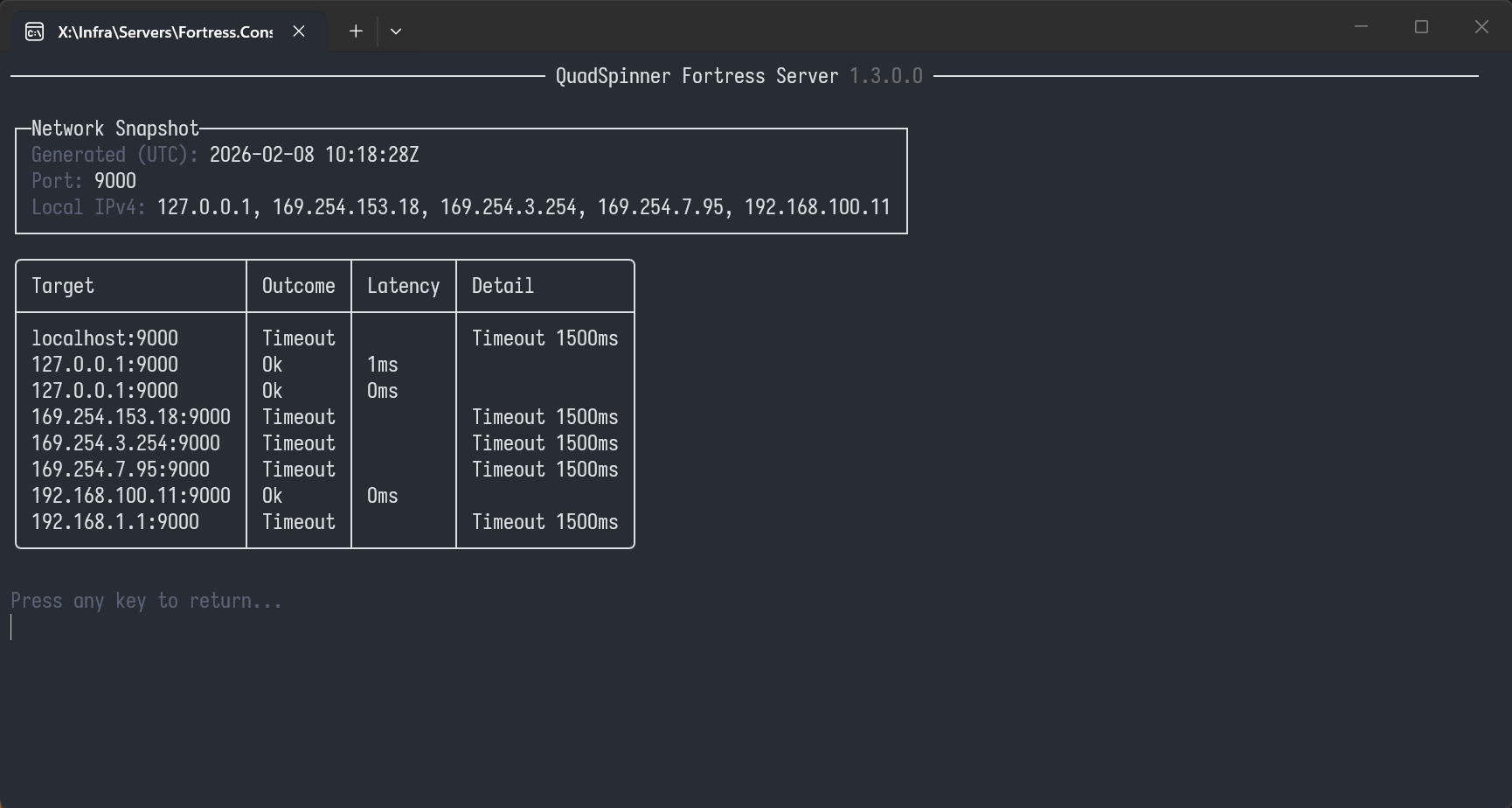
Network snapshot
- Local IPv4 addresses detected on the server
- (Optional) DNS resolution for the "advertised host/IP" Connection tests (TCP connect)
localhost:<port>127.0.0.1:<port>(if loopback included)<each local IPv4>:<port>- (Optional)
<advertised host/IP>:<port>Hints - Simple conclusions derived from the test results (e.g. "bound to loopback only", "possible firewall block", "DNS failed").
Inputs
You’ll be asked:
Advertised host/IP (optional)
- Enter the exact address your clients are using (e.g.
licenseserver.company.lanor10.10.0.12). - Leave blank if you only want local checks.
The port is taken from the server’s current config/status.
Output
You’ll see:
Network Snapshot
- Generated time (UTC)
- Port
- Local IPv4 list
Test Matrix Each row shows:
- Target (
host:port) - Outcome (
Ok,Refused,Timeout,DnsFailed,Unreachable,Error) - Latency (when available)
- Detail (error/diagnostic text)
Hints
- Short, actionable messages derived from the test results.
Interpreting outcomes
- Ok: Server could open a TCP connection to that target/port. If
localhostis OK but NIC IPs are not, you are likely bound to loopback only. - Refused: The OS responded immediately: nothing is listening at that target/port. Usually means server isn’t listening on that port/interface (wrong port, wrong bind address, server not running).
- Timeout: No response within the timeout window. Common causes: firewall/AV, network ACLs, wrong routing, host not reachable, or port silently dropped.
- DnsFailed: Hostname couldn’t be resolved to an IP. DNS misconfiguration, wrong hostname, missing record, or wrong DNS server.
- Unreachable: The network stack reports no route / host unreachable. Routing issue, disconnected network, invalid IP, or target is on a different network without route.
- Error: Misc failure (socket or system-level). Check the "Detail" column.
Common scenarios
- localhost OK, 127.0.0.1 OK, but all NIC IPs fail/timeout/refused
- Likely bound to loopback.
- Fix: bind listener to
0.0.0.0:<port>or the correct NIC IP.
- Everything is Refused
- Server likely not listening on the configured port.
- Fix: confirm the server is running, confirm configured port, check port conflicts.
- Everything is Timeout
- Strong signal of firewall/AV blocking inbound, or the wrong port is being used.
- Fix: open inbound firewall rule for the port; confirm port matches what clients use.
- Advertised host shows DnsFailed
- Clients using a hostname will fail too.
- Fix: correct DNS record or change clients to use a valid IP/hostname.
- Advertised host resolves, but connect fails while local NIC connect succeeds
- Often indicates clients are using the wrong route/segment (NAT/VPN split) or the hostname points to the wrong IP.
- Fix: correct DNS target IP; ensure advertised endpoint is reachable from the client network.
Recommended usage pattern
When troubleshooting a client report:
- Run Network diagnostics with the advertised host/IP the client is using.
- Confirm at least one of:
- Advertised endpoint test is Ok
- A NIC IP test is Ok and that IP is what clients should use
- If not OK, follow the Hints section and rerun after changes.
Notes
- The tool performs only safe, targeted connect tests (no scanning).
- Results reflect server-side perspective. If the server can connect to itself but clients still fail, you likely have a network boundary issue (client-side firewall, routing, VLAN ACLs). In that case, use a minimal client probe tool (recommended separately) from the client machine.
 using AngryMonkey