
Lifecycle of a License Token
The life cycle of a License Token can help IT Administrators
Lifecycle Overview
The typical lifecycle of a license token is:
- Allocation or Announcement
- Heartbeat
- Deallocation
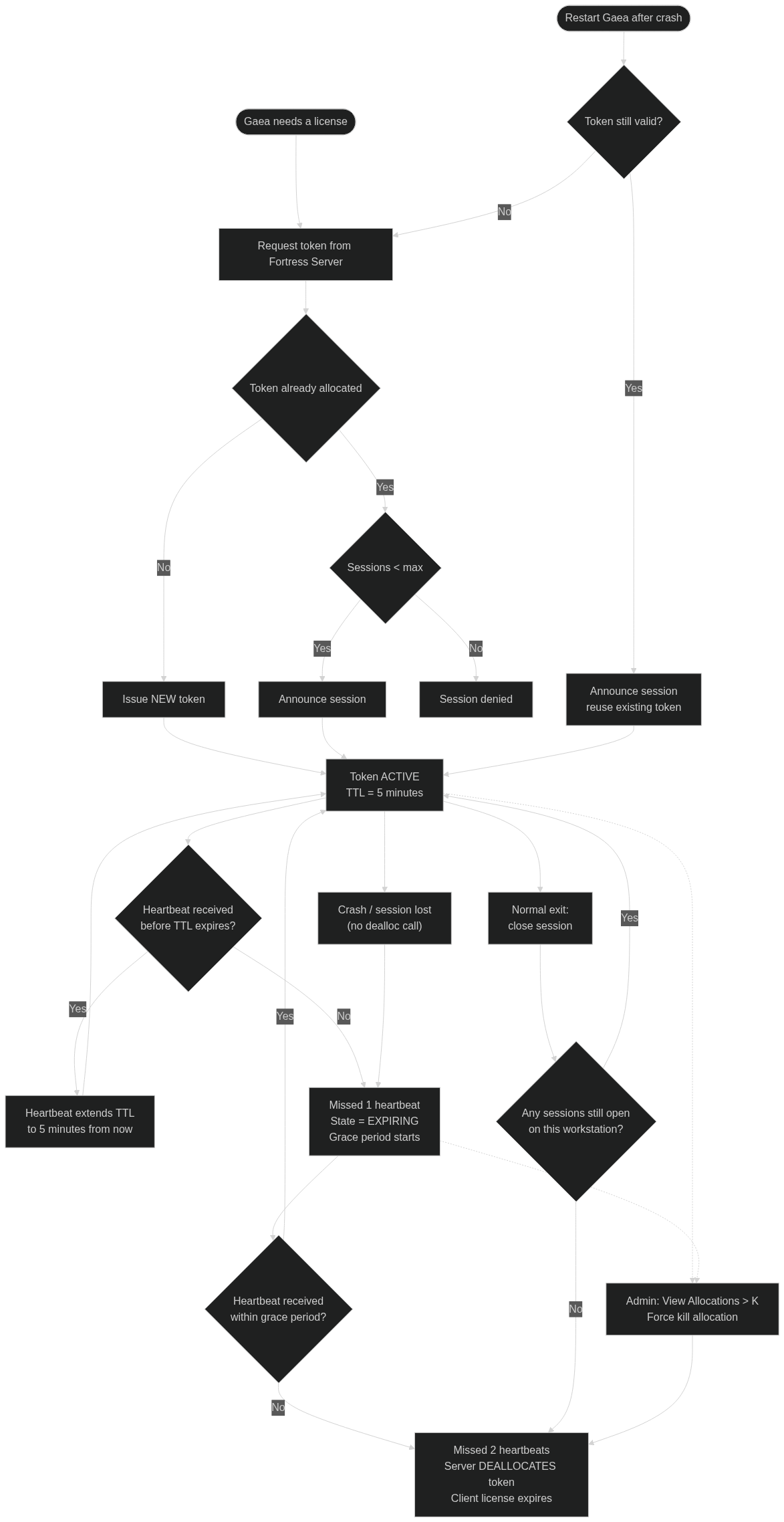
Allocation or Announcement
When Gaea asks the Fortress Server for a license, the Server checks if that IP was already assigned a license.
- If there is no license allocated to this IP, a new license token is issued.
- If a license token exists, a new session for that IP is announced to the server.
To prevent license-exhaustion, Gaea allows up to 4 simultaneous sessions on a single IP as long as it is under the same user. This allows the user to run multiple instances, or run background builds while designing a terrain, without using up additional license slots.
If the maximum number of sessions, typically 8, is reached the new sessions will not be allowed.
Heartbeat
Every license has a 5 minute lifespan. Gaea pings the server to let it know it is still alive and using the license token. Each heartbeat extends the toke n
If a license token misses a heartbeat, the token's state is set to Expiring and the license is put into a grace period. This grace period is important because you don't want a momentary network outage or other temporary interruption to expire the license.
If a license token misses two heartbeats, the token is deallocated on the server. Without a heartbeat, the license expires on the workstations as well.
Recovering from a Crash
If Gaea crashes, and you start it again it will check if the license still has a heartbeat left. If so, it will announce itself to the Fortress Server and try to reuse the existing token.
If the heartbeat has expired, Gaea will request a new license.
Deallocation
When Gaea exits normally, the license token is released. If there are multiple sessions open on the same workstation, the appropriate session is closed.
The license token is not released until all sessions are closed.
If any session is closed through a crash, it will take up to 2 heartbeats to release the license so it can be used elsewhere.
The Server Admin can use View Allocations > K command to forcefully kill the allocation and release the license immediately.
Troubleshooting checklist
- Client cannot obtain a license
- Verify
floating.licis present in the correct data folder. - Confirm the host/IP and port are correct.
- Run Network Diagnostics on the server.
- Verify
- Server reachable by
localhostbut not by NIC IP- Server is likely bound to loopback only.
- Bind to
0.0.0.0or the correct NIC address.
- Clients intermittently lose licenses
- Check for firewall/AV interference, unstable VPN, or routing issues.
- Confirm server clock stability and network reliability.
 using AngryMonkey