
When to Use It
Use MultiFractal when you need a multi-noise that can have a large level of variations.
Visual Direction
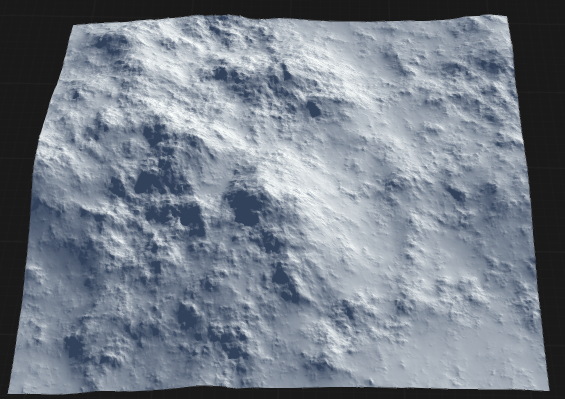
Properties
| FractalSelects the type of fractal noise used to generate the terrain. Each type produces distinct shapes and features. | |
| Noise Type | Selects the type of fractal noise used to generate the terrain. Each type produces distinct shapes and features. FBMFractal Brownian Motion. Produces varied, natural-looking noise with a balanced mix of peaks and valleys. BillowyCreates softer, rounded, and bulbous shapes, ideal for rolling hills or smooth terrain. RidgedGenerates sharp, jagged features, resulting in more dramatic and rugged terrain. |
| Auto Octaves | Automatically determines the optimal number of octaves for the fractal, balancing detail and performance. |
| Octaves | Specifies the number of noise layers (octaves) used. Higher values increase detail and complexity, but may impact performance. |
| Scale | Controls the overall size of the fractal features. Lower values create larger features, while higher values produce finer details. |
| Relative Feature Scale | Adjusts the scale of features relative to the terrain size, allowing for proportional detail regardless of resolution. |
| Roughness | Determines the roughness of the fractal. Lower values result in smoother shapes, while higher values create more rugged, detailed surfaces. |
| Edge Smoothing | Smooths the edges of the generated terrain, reducing harsh transitions and creating a more natural appearance. |
| Seed | Sets the random seed for noise generation. Changing the seed produces different terrain patterns while keeping other settings the same. |
| VariationSelects the method of applying variation to the fractal. | |
| Type | Selects the method of applying variation to the fractal. Secondary FractalUses a secondary fractal to modulate the main fractal, adding additional layers of complexity and detail. Self ModulationApplies self-modulation, where the fractal modulates itself to create more intricate and unique patterns. |
| Variation | Selects the method of applying variation to the fractal. |
| Smoothness | Adjusts the smoothness of the variation, with higher values producing gentler transitions and lower values creating sharper changes. |
| Contrast | Controls the contrast of the variation, increasing or decreasing the difference between high and low areas. |
| Damping | Reduces the intensity of variation or modulation, helping to prevent overly chaotic or extreme results. |
| Bias | Shifts the overall output of the variation, allowing you to favor higher or lower values in the resulting terrain. |
| PositionRotates the fractal pattern, changing the orientation of features across the terrain. | |
| Rotation | Rotates the fractal pattern, changing the orientation of features across the terrain. |
| Anisotropy | Applies directional scaling to the fractal, stretching or compressing features along a specific axis. |
| Offset X | Shifts the fractal pattern horizontally, moving features left or right across the terrain. |
| Offset Y | Shifts the fractal pattern vertically, moving features up or down across the terrain. |
| WarpSelects the type of warping applied to the fractal pattern. | |
| Perturb | Selects the type of warping applied to the fractal pattern. NoneNo warping is applied. The fractal pattern remains unaltered. SimpleApplies basic, soft warping to the fractal, gently distorting features for a more natural look. ComplexApplies advanced, turbulent warping, creating highly irregular and dynamic terrain features. |
| Relative Size | Controls the size of the warp effect relative to the overall terrain, allowing for proportional distortion. |
| Strength | Sets the intensity of the warp effect. Higher values produce more pronounced distortion. |
| Complexity | Adjusts the complexity of the warp, increasing the number of layers or detail in the distortion. |
| Roughness | Determines the roughness of the fractal. Lower values result in smoother shapes, while higher values create more rugged, detailed surfaces. |
| Attenuation | Reduces the strength of the warp effect over distance, allowing for localized or fading distortion. |
| Iterations | Specifies how many times the warp effect is applied, with higher values increasing the overall distortion. |
| Relative Anisotropy | Controls the directional scaling of the warp effect, stretching or compressing the distortion along a specific axis. |
 using AngryMonkey