
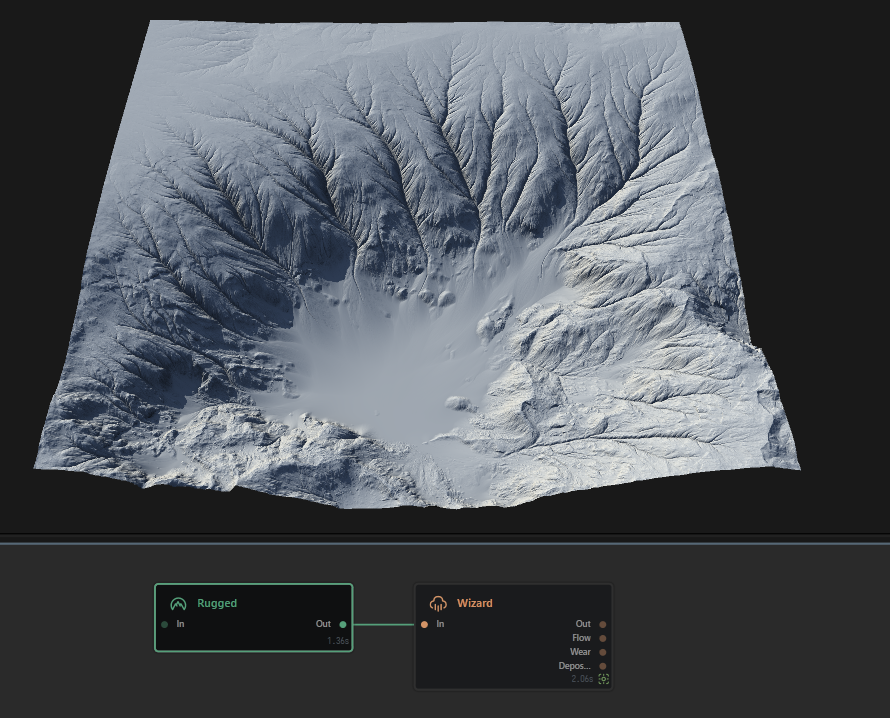
The Erosion Wizard is a lightweight wrapper for the Erosion node. It simplifies the settings through curated presets, and provides secondary passes for additional processing. The Wizard node is meant to replace the Erosion node - in fact, it is meant to augment it. For many direct and basic uses, Wizard can help achieve results much faster than with the Erosion node.
When to Use It
Use Wizard when you need the Erosion Wizard is a lightweight wrapper for the Erosion node.
Comparison to Erosion
Gaea gives you two ways to use our hydraulic erosion simulation process: the Erosion node, which gives you absolute control over every aspect, or the Wizard node which gives you easier access to the major aspects. Both use the same simulation underneath, but provide different interfaces. Both have their pros and cons.
Erosion provides access to all the simulation controls, however, it can take some time to find the sweet spot for many different settings. Wizard on the other hand provides fewer, easier choices and various "recipes" for creating different types of results, however, it does not allow you to fine tune your results.
For a comparison between the two, see erosions.
Phases and Recipes
The goal of the Wizard node is to quickly create common erosion features with minimal effort. For this purpose, the erosion simulation is packed into two parts: Phases and Recipes. The Wizard node can perform the simulation in two phases, and you can define the recipes for each phase. Recipes are partially predefined erosion settings that give specific results.
Phase 1 is fully customizable. You can choose a recipe and define all the parameters for the simulation such as channel depth, sedimentary deposit amount, and more. The first phase can be repeated several times by changing the Phase 1 recipe, while ensuring each recurrance uses the same parameters.
Phase 2 is comprised of lightweight recipes that can be applied either on top of Phase 1, or by itself. It can create rivers, low talus, deep furrows, and more.
Prevent Over-Erosion
A common problem many users encounter is that strong erosion can destroy the precise shape they have created. This is because erosion, by definition, will remove material from the terrain to create erosive results. The Bulk parameter helps prevent this. By bulking up the terrain even slightly, sharper peaks and delicate areas are less prone to become too eroded or spikey.
Visual Direction
Properties
| ErosionSets the strength of fluvial erosion. This parameter controls the sediment transport capacity, that is how much of dissolved minerals water can carry. This parameter can be set to value that is higher than 1.0, this can speed up the erosion process, but also can result in lesser erosion quality, especially if erosion softness value is high too. | |
| Strength | Sets the strength of fluvial erosion. This parameter controls the sediment transport capacity, that is how much of dissolved minerals water can carry. This parameter can be set to value that is higher than 1.0, this can speed up the erosion process, but also can result in lesser erosion quality, especially if erosion softness value is high too.
Low |
| Density | Controls the density of rock material. The softer rock is, the faster is erosion process but may produce bulbous deposits.
Low |
| Material | Defines the general material of the terrain, ranging from fine sand to large rocks, or a mix of both.
Low |
| Channel Depth | This parameter controls the amount of downcutting, or vertical erosion. This results in deeper channels, and can be useful for getting mountain ranges.
Low |
| Channel Width | This parameter controls the width of the channels by creating sediment deposits in the base of the channels.
Low |
| Deposits | This controls the amount of sedimentary deposits generated by the erosion process.
Low |
| Removal | This parameter can reduce the amount of sediments generated during erosion, creating deeper channels.
Low |
| Bulk | Increases the bulk of the terrain before eroding. When using strong settings, having some bulk can help prevent the terrain from eroding too much and losing its shape.
Low |
| Seed | The randomization pattern or seed for the node's process. |
 using AngryMonkey