
If your terrain has a hard edge, you can turn on Fade Edges. Or for more precise control, try using the Edge or Clip before applying the Bomber node.
When to Use It
Use Bomber when you need takes an input heightfield and "stamps" or bombs it across the entire surface of the terrain using the randomization properties you set.
Visual Direction
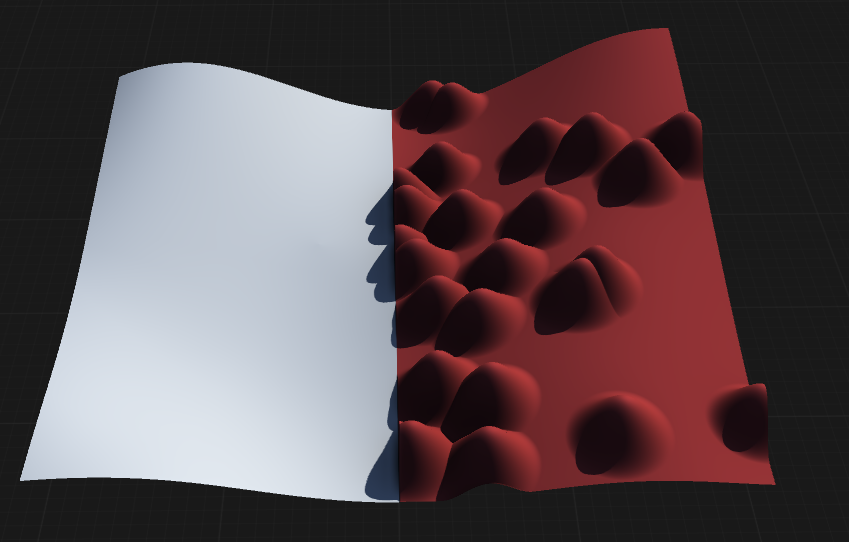
Properties
| Bomber | |
| Iterations | Number of instances the bombing operation will create. Higher values increase the number of scattered elements. |
| Multiplier | Quickly multiply the number of bombed instances by increasing or decreasing this value, scaling the overall density. |
| Size | The minimum and maximum relative size of bombed instances, allowing for variation in the scale of each element. |
| Size Distribution | Controls the uniformity of the size of bombed instances. Higher values produce more consistent sizes, while lower values allow greater variation. |
| Rotation | The minimum and maximum range of rotations for the bombed instances, introducing random orientation for each element. |
| Proportional | Determines whether instances should maintain height-to-size proportion. When enabled, scaling an instance will also scale its height proportionally. |
| Variable Height | Allows variations in the height of bombed instances, introducing additional randomness to their elevation. |
| Height | The minimum and maximum range of height variations for the bombed instances, controlling how tall or flat each element can be. |
| Distribution | The method used to distribute bombed instances across the surface. RandomA randomized distribution that results in pure chaotic patterns, scattering instances unpredictably. GridA normalized grid distribution function that results in a systematic, evenly spaced pattern. |
| Jitter | The random offset applied to each instance while distributing, adding natural variation to their placement. |
| Seed | The randomization pattern or seed for the node's process. Changing the seed produces different distribution patterns. |
| Fade Edges | Softens the edges of bombed instances, blending them more smoothly into the base terrain. |
| Blend Mode | Specifies how the base terrain and bombed instances are merged together. NoneEach instance overwrites the underlying terrain at its location. BlendBlends instances with the base terrain using standard blending. AddAdds the height values of instances on top of the base terrain. SubtractSubtracts each instance from the base and previous instances, creating depressions. DifferenceCreates a difference between the base and each bombed instance, emphasizing changes. MultiplyMultiplies the base terrain with each bombed instance, modulating the result. ScreenAdds the two inputs without overexposing the output, resulting in a lighter blend. MaxRetains the maximum height values of each bombed instance and the base terrain. MinRetains the minimum height values of each bombed instance and the base terrain. |
| Quality | The level of quality to be used for the bombing operation. Draft is recommended for high-resolution previews, while Medium and High provide better final results. DraftFastest processing with lower quality, suitable for previews. MediumBalanced quality and performance for general use. HighHighest quality with the most detail, recommended for final output. |
| Commands | |
| Add Input | Allows an additional input to be included in the bombing operation, enabling more complex or layered effects. |
 using AngryMonkey